KDPBuilder vs BookBolt: Workflow Comparison

Skip the theory? Generate a free book preview in about a minute — no signup, no card.
Try it freeKDPBuilder vs BookBolt is not a feature-count contest. It is a workflow decision. BookBolt is the better fit when your first job is niche research, keyword discovery, and fast low-content assembly. KDPBuilder is the better fit when the job is bigger: creating a coordinated KDP publishing package with designed interiors, a full-wrap cover, metadata, and export-ready files that are ready for the next upload step.
If you are comparing KDPBuilder vs BookBolt in 2026, ask one question first: where does my publishing workflow actually break? If it breaks at “I do not know what niche to enter,” BookBolt deserves a serious look. If it breaks at “my books look assembled from separate tools,” KDPBuilder is the stronger match. For a broader side-by-side view of the market, start with our Compare Publishing Tools guide.
KDPBuilder vs BookBolt: quick verdict for 2026
BookBolt fits sellers who want research, keyword discovery, listing analysis, and straightforward low-content production. KDPBuilder fits publishers who want a more complete studio workflow for designed interiors, covers, metadata, puzzle books, coloring books, journals, planners, and export-ready book files. For context on the difference between a generator and a studio workflow, read AI Book Generator vs AI Publishing Studio.
| Workflow area | KDPBuilder | BookBolt |
|---|---|---|
| Best for | Designed, publish-ready KDP book packages | Research and simple low-content production |
| Workflow depth | End-to-end publishing studio | Toolset centered on discovery and creation |
| Interiors | Designed interiors, activity pages, puzzle books, structured book builds | Simple interiors and low-content tools |
| Covers | Cover creation aligned with final file setup | Useful support, often paired with other tools |
| Metadata | Built into the publishing workflow | Useful for research and listing preparation |
| Puzzle books | Strong fit for polished puzzle projects with answer keys | Useful for puzzle-oriented creation and niche testing |
| Coloring books | Better for branded, differentiated coloring book packages | Good for simpler or research-led workflows |
| Research | Supported, but not the only focus | Primary strength |
| Pricing model | Check the current KDPBuilder pricing page | Verify current plans on BookBolt’s site |
Choose KDPBuilder if...
- You want one workflow that moves from concept to finished files.
- You are building a catalog of coloring books, journals, planners, activity books, or puzzle books with consistent branding.
- You want interiors, covers, and metadata to feel coordinated instead of assembled from separate apps.
- You care about making books that look intentionally designed rather than generic.
- You need a practical way to package the final files KDP asks for during upload.
Choose BookBolt if...
- Your main need is niche research and low-content opportunity spotting.
- You already have a design stack and only need creation support in a few places.
- You are testing simple book ideas before investing in a fuller publishing workflow.
- You prefer a browser-friendly tool that stays close to research and lightweight production.
| If your workflow is... | Better fit | Why |
|---|---|---|
| Find a niche, validate an idea, then build quickly | BookBolt | Research and light production are its strongest use case |
| Create a branded book that feels finished and consistent | KDPBuilder | It is built as a publishing studio, not just a discovery tool |
| Produce puzzle books with print-ready structure | KDPBuilder | Dedicated puzzle generators and final file packaging support the full workflow |
| Use separate tools for every step | BookBolt | It can fit a narrower, modular workflow |
Where BookBolt fits in a KDP publishing workflow
BookBolt is best understood as a KDP research and low-content publishing tool, not a full publishing studio. It can help you identify niches, explore keywords, analyze listings, and create simple interiors for books that do not require a complex production process. That makes it useful for sellers who already know how to package a book and mainly need support finding ideas and assembling basic content.
That distinction matters because many people searching for a BookBolt review in 2026 are not simply asking whether the software works. They are asking where it fits in the publishing workflow. The honest answer: BookBolt is practical when your process starts with “what should I make?” and ends with “how do I assemble it fast?” It is less about operating like a publishing studio and more about helping you move through research and simpler book production efficiently.
BookBolt strengths
- Keyword research: Useful for identifying search terms and listing angles before you create a book.
- Category and niche discovery: Helps you scan opportunities instead of guessing randomly.
- Listing analysis: Supports smarter positioning by showing how books are presented in the market.
- Simple interiors: Works well for basic low-content books where the pages are not highly customized.
- Puzzle and activity support: Helpful if your book is built around puzzles, prompts, or repeatable page structures.
- Browser workflow: Convenient for creators who want a lighter, quick-access process.
BookBolt limitations
- It is not built to be a complete studio for concept, design, metadata, cover coordination, and final file packaging in one place.
- Its best use case is often research plus simple production, not a deeply branded publishing system.
- If you need polished differentiation across multiple book types, you may still need extra design and formatting tools.
- For more complete projects, the workflow can become fragmented if you are stitching together too many separate apps.
So if you are asking, “Is BookBolt enough?” the answer depends on the book type. For a straightforward notebook, a simple puzzle book, or a low-content test, it may be enough. For a catalog strategy where interiors, covers, and metadata need to feel coordinated across a series, a broader publishing workflow becomes more important.
Where KDPBuilder fits: from idea to publish-ready book
KDPBuilder is positioned as a publishing studio for the full book-building workflow: concept, interior, manuscript or activity content, cover, metadata, and export-ready files. That is the difference between generating part of a book and assembling a complete publishing package. If your goal is to stop shipping books that look generated and start building books that look designed, KDPBuilder is built for that shift. You can review current plan options on the KDPBuilder Pricing page.
This matters because KDP publishing is not only about producing pages. Amazon KDP print books must meet content and quality guidelines, including rules against misleading metadata, poor-quality files, and content that creates a disappointing customer experience. A workflow that helps align the interior, cover, trim, and metadata can reduce avoidable final-mile mistakes.
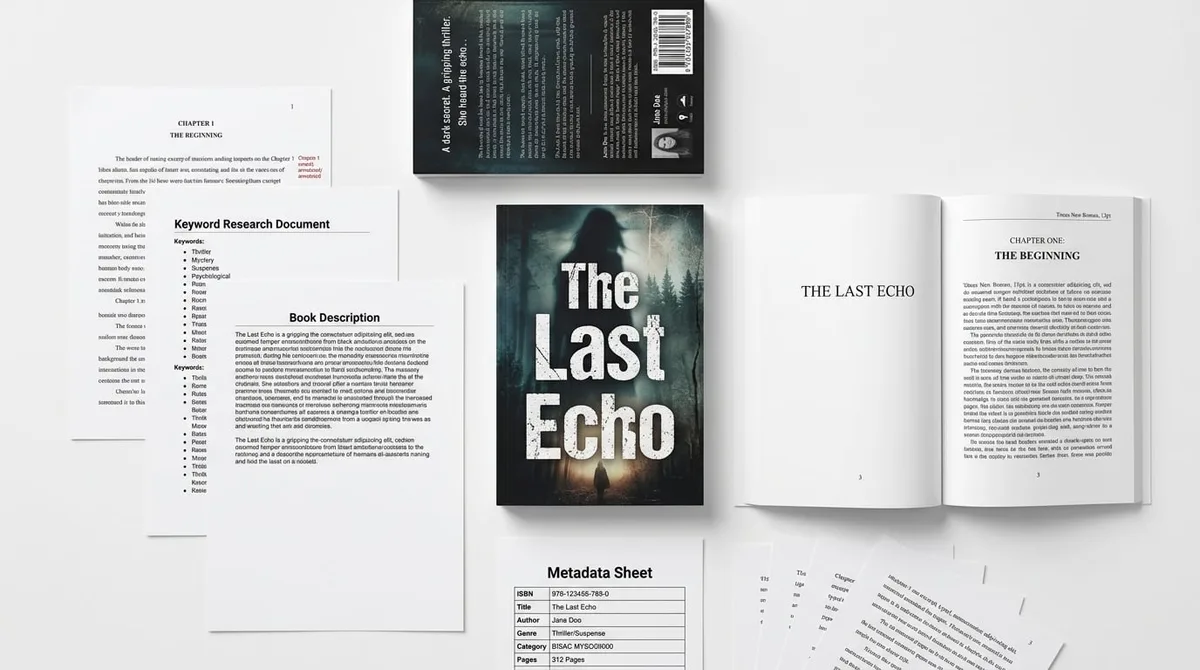
A KDPBuilder publishing package includes the print-ready interior PDF, full-wrap cover at 300 DPI, ebook file, and a metadata sheet with title, subtitle, description, 7 keywords, and category picks — the same core assets KDP’s upload flow asks you to prepare. See what’s in a publishing package.
A complete KDP workflow also has to account for print economics. Amazon KDP paperback royalties are generally 60% of list price minus printing costs for books sold through Amazon marketplaces, with expanded distribution typically paying 40% minus printing costs. That makes final file setup more than a technical chore: trim size, page count, color choice, and paper type all affect margin and reader experience.
Designed output, not just generated output
- Coherent interiors: Pages should match the book’s intended audience, not just fill space.
- Cover alignment: Front cover, spine, and back cover should work together visually and technically.
- Metadata support: Titles, subtitles, and descriptions should match the book’s actual content.
- Brand consistency: A series should look like a series, not like separate experiments.
In practical terms, KDPBuilder is for creators who need a publishing system rather than a one-off generator. That can mean a children’s coloring book with a consistent theme, a planner with structured pages, a puzzle book with a consistent difficulty pattern, or a journal series with a repeatable design language.
A workflow for serious KDP publishers
- Pick a book concept that fits a real audience, such as kids, seniors, hobbyists, teachers, or planners.
- Build the interior around that audience using the right page structure, trim size, and reading experience.
- Create or align the cover so the spine, bleed, and page count are accurate.
- Write metadata that matches the content and avoids overpromising.
- Export files that are ready for the upload process instead of requiring extra cleanup.
That is why many publishers compare KDPBuilder vs BookBolt differently after their first few books. BookBolt can help you discover and start. KDPBuilder helps you finish with a more polished package.
BookBolt alternative: when KDPBuilder is the better fit
If you are searching for a BookBolt alternative in 2026, the key question is whether you need a toolkit or a publishing system. KDPBuilder is the better fit when you are creating brandable series, polished covers, differentiated interiors, and metadata that supports a complete publishing strategy.
That does not mean every BookBolt user should switch. It means the use case changes. If your main goal is to test a niche or create a simple low-content title, BookBolt can be enough. If you are creating a catalog, a branded line, or a more differentiated product that needs to feel intentional, KDPBuilder is often the better workflow fit. If you are still comparing broader options, the guide on KDPBuilder Alternatives: When to Choose Each can help you narrow the decision.
For creators building a catalog, not one-off books
- Use KDPBuilder when you want multiple books to share the same design language.
- Use it when you need repeatable page structures for a series.
- Use it when the next book should look related to the last one, but not identical.
- Use it when you are planning more than a single test title.
For publishers who care about design consistency
Design consistency is a practical issue, not just an aesthetic one. A coloring book, journal, or puzzle title with mismatched cover cues and generic interiors can feel incomplete. KDPBuilder gives you a workflow suited to building a recognizable brand across titles, while BookBolt remains stronger for research-heavy workflows and simpler production tasks.
Coloring books, puzzle books, and activity books compared
For creators looking at an AI coloring book generator, coloring book maker, coloring book AI tool, or KDP coloring book generator, the real comparison is not just which tool can produce pages. The stronger workflow is the one that keeps theme, trim size, margins, cover fit, metadata, and audience positioning aligned. That is where a publishing studio approach can outperform a research-first approach.
Coloring books, puzzle books, and activity books all depend on structure. A good interior is only one part of the project. If the trim size is wrong, the pages may feel cramped. If the margins are off, the art may sit too close to the edge. If the cover does not match the final page count, the book may not present correctly. If the metadata is generic, the book can be hard to position.
AI coloring book generator workflows
- BookBolt: Can help with low-content setup and idea testing, especially if you already know the audience and style.
- KDPBuilder: Better when you want a designed coloring book with stronger concept alignment and a polished final package.
- Best practice: Build a theme first, such as animals, vehicles, mandalas, seasonal activities, or classroom worksheets, then match the cover and metadata to that theme.
Example: a kids’ dinosaur coloring book should not feel like a random stack of generated pages. It should have a clear age range, consistent illustration style, repeated visual cues, and a cover that tells parents exactly what kind of experience is inside. That is the difference between a page generator and a publishing workflow.
Puzzle book generator workflows
Puzzle books have their own production needs. Word searches, mazes, logic puzzles, sudoku, crosswords, and mixed activity books require page balance and audience fit. If you are building a puzzle title for adults, kids, or a themed niche, the workflow has to support both content creation and print setup.
For a closer look at the tool itself, the Puzzle Book Generator page shows how puzzle interiors are handled inside the workflow. The challenge is not only making puzzles; it is making puzzles that are easy to lay out, ready to print, and complete with answer keys.
Puzzle interiors are built by dedicated generators — sudoku with verified unique solutions and symmetric givens, crosswords constrained to professional 13×15 grids, and mazes rendered as clean line art — then laid out as print-ready PDF spreads with answer keys. Generate a sample puzzle page.
BookBolt can be useful if your priority is discovering puzzle-friendly niches or creating simpler puzzle interiors. But if you are planning a more polished title with branded pages and a coordinated cover, the publishing-studio workflow is usually easier to manage.
Large print puzzle books for seniors
- Use larger fonts and clearer spacing so the pages are easy to use.
- Choose a trim size that supports visibility without overcrowding.
- Keep the cover promise accurate: large print should actually be legible inside.
- Match puzzle difficulty to the target reader rather than assuming more puzzles means a better book.
Large print puzzle books for seniors are a good example of why workflow matters more than generation speed. A tool can make puzzles quickly, but the finished book still has to be comfortable to use, visually clear, and properly packaged for the intended reader.
Covers and file setup: cover creator vs cover calculator
Cover setup is one of the most common final-mile publishing problems, which is why people search for terms like Amazon KDP cover calculator, KDP calculator, KDP cover creator, KDP cover size calculator, book cover calculator, and cover creator. The reason these terms matter is simple: KDP cover dimensions depend on trim size, page count, ink and paper type, and bleed. The final cover file has to account for front cover, back cover, spine, and bleed.
In practice, a cover workflow has two jobs. First, it has to calculate the technical dimensions. Second, it has to produce a design that matches the book. A research-heavy tool may help you start, but a publish-ready workflow should reduce the chance of spine width errors, misplaced text, or mismatched bleed settings.
Why cover size matters before upload
- Trim size: The interior dimensions determine how large the cover panels need to be.
- Page count: More pages change the spine width.
- Paper type: Ink and paper choices affect the final measurements.
- Bleed: Full-bleed interiors require correct edge allowance.
- Format: Paperback and hardcover require different cover setups.
If you wait until upload day to solve cover size, you are already behind. A publish-ready workflow should help you think about the cover before the files are exported. That is especially important for puzzle books and coloring books, where interior length and layout decisions directly affect the final cover dimensions.
What a publish-ready cover workflow should include
- Select the trim size first, not last.
- Set the page count based on the finished interior.
- Confirm whether the book needs bleed.
- Generate or design the cover with the correct spine width.
- Check that title, subtitle, and back cover copy fit the design.
- Export the cover in a format that matches KDP upload requirements.
This is where KDPBuilder has an edge for publishers who want a more unified process. BookBolt can support parts of the workflow, but if you are comparing KDP cover creator options against a broader production studio, the question is not only “Can it make a cover?” It is “Can it help me get a cover that fits the final book without extra patchwork?”
Pricing and value: which workflow saves more time?
Pricing should be judged against your publishing goal, not against a static feature checklist. A tool can look inexpensive and still cost you time if you need to add separate design software, formatting tools, cover calculators, or editing passes. Another tool may look more premium but save time because the workflow is more cohesive.
For KDPBuilder, check the current pricing page rather than relying on old comparisons. For BookBolt, verify current plans on BookBolt’s own site because features and pricing can change. That is the only reliable way to compare value in 2026. If you are ready to evaluate plan fit directly, start with KDPBuilder Pricing and decide whether the included workflow matches your publishing goals.
Cost for beginners
- If you are just testing one niche, BookBolt may feel easier to start with.
- If you want a more guided publishing workflow, KDPBuilder may reduce the number of tools you need to juggle.
- Beginners should count the cost of cover tools, image tools, formatting time, and revision time — not just the subscription price.
For a beginner, the cheapest plan is not always the cheapest workflow. If you need three extra tools to finish the book, the true cost is higher than the monthly subscription alone.
Cost for serious catalog builders
- Catalog builders should compare total workflow time, not only software price.
- Consistency across multiple books can reduce revision time and packaging mistakes.
- Design coordination becomes more valuable as your catalog grows.
- A single studio workflow can be easier to manage than several disconnected tools.
Serious publishers often save the most time with the workflow that reduces friction across many titles. That is why the KDPBuilder vs BookBolt comparison changes as your catalog grows. BookBolt can be practical for research-driven production. KDPBuilder becomes more compelling when speed has to coexist with design consistency and publish-ready packaging.
Final recommendation: KDPBuilder vs BookBolt
Use BookBolt if research and simple low-content production are your priority. Choose KDPBuilder if your goal is to create designed, differentiated, publish-ready books that feel like real publishing projects rather than quick generation tasks. That is the bottom-funnel answer: BookBolt helps you decide what to make; KDPBuilder helps you package what you make into a more complete book product.
Here is the practical decision matrix by publisher type:
- Beginner testing niches: BookBolt is a practical start if you mainly need research and light production.
- Puzzle book publisher: KDPBuilder is the stronger fit when you want the puzzle book to feel polished, branded, and complete with answer keys.
- Coloring book creator: KDPBuilder is better when you want a book that looks designed, not assembled.
- Brand-builder: KDPBuilder is the better fit for consistent series and repeatable visual identity.
- Agency or freelancer: KDPBuilder is stronger when you need to deliver finished book packages for clients.
- Catalog operator: KDPBuilder is the better workflow when you care about volume, consistency, and differentiated output.
If you want more context on how product categories differ, read KDPBuilder vs ChatGPT for KDP Publishing. If you already know you need a studio workflow, review KDPBuilder Pricing and then register when you are ready to build your first package.
FAQ
Is KDPBuilder a good BookBolt alternative?
Yes, if your main need is a more complete publishing workflow. KDPBuilder is a strong BookBolt alternative for creators who want designed interiors, covers, metadata support, and publish-ready files in one studio-style process. If you only need research and simple low-content production, BookBolt may still be the better fit.
Which is better for Amazon KDP, KDPBuilder or BookBolt?
It depends on your goal. BookBolt is better for niche research and lighter book creation, while KDPBuilder is better for publishers who want a more finished result. If you are building a branded catalog or polished book series, KDPBuilder usually fits the workflow better.
Does BookBolt include an Amazon KDP cover calculator?
BookBolt may support cover-related workflow elements, but you should verify the current feature set on its site. Cover setup always depends on trim size, page count, paper type, bleed, and spine width, so any calculator or creator still needs to match your final interior. Always confirm exact current capabilities before buying.
Can I use KDPBuilder as an AI coloring book generator?
Yes, if your goal is to create a coloring book workflow that goes beyond page generation. KDPBuilder is a good fit when you want the interior, cover, and metadata to work together as a finished book. That is especially useful for kids’ coloring books, themed books, and branded series.
Which tool is better for puzzle books and large print puzzle books for seniors?
KDPBuilder is usually the stronger fit when you want a polished puzzle book designed for a specific audience. Large print puzzle books for seniors especially benefit from better spacing, clearer layout choices, and a cover that accurately reflects the inside. BookBolt can still be useful for research and simpler puzzle production.
Do I still need a KDP cover size calculator if I use a publishing studio?
You still need accurate cover dimensions, but a publishing studio can reduce the manual guesswork. Because KDP cover dimensions depend on trim size, page count, paper type, and bleed, the cover still has to be calculated correctly before upload. A studio workflow helps coordinate those details, but it does not remove the need for accuracy.
Ready to compare the workflow against your own publishing process? Review KDPBuilder Pricing, confirm what is included, and create your account when you are ready to move from comparison to building.
Turn this idea into a book — free sample
Type a book idea and we'll generate a real cover preview in about a minute. No signup, no card.