KDPBuilder vs ChatGPT for KDP Publishing

Skip the theory? Generate a free book preview in about a minute — no signup, no card.
Try it freeKDPBuilder vs ChatGPT is not a fair fight if you judge both tools by the same job. ChatGPT is a strong thinking partner: it can outline a book, draft sections, rewrite blurbs, and help you test ideas quickly. But it stops short of the work that usually slows KDP publishers down: cover specs, interior formatting, metadata alignment, export files, and making the finished book feel like one coherent product.
KDPBuilder is built for that production gap. Instead of leaving you with text to copy into five other tools, it moves a book through a publishing-studio workflow: manuscript, editing, design, cover, metadata, and KDP-ready files. So the real question is simple: do you need a chat assistant, or do you need a finished publishing package?
KDPBuilder vs ChatGPT: the short answer
If you want help thinking through a book, ChatGPT is useful. If you want a book package that looks designed across the manuscript, cover, interior, metadata, and export files, KDPBuilder is the better fit. The difference is not “AI versus AI.” It is chat assistant versus publishing studio.
That matters because KDP publishing is more than generating words. A paperback needs a correctly sized cover wrap, an interior that matches the trim size, clean metadata, and files prepared for KDP’s upload flow. ChatGPT can help with the content pieces, but it does not assemble the full product. If you want to see how a structured workflow solves that handoff problem, you can compare publishing tools before deciding which system fits your process.
KDPBuilder runs every book through a six-phase studio pipeline — Discovery, Writing, Editing, Design, Covers, Publishing — instead of a single generate-and-dump step. Walk through the pipeline free.
| Area | ChatGPT | KDPBuilder |
| Manuscript | Drafts, outlines, rewrites | Structured for book production |
| Cover | Can describe concepts | Built for a KDP-ready cover workflow |
| Interior | Can suggest layouts and text | Designed to output publish-ready interiors |
| Metadata | Brainstorms titles, blurbs, and keywords | Matches listing language to the book package |
| File export | No final publishing package | Produces KDP-ready files |
| KDP compliance | User must verify everything | Workflow is built around publishing requirements |
| Production time | Manual assembly required | Streamlined package creation |
Who should use ChatGPT
Use ChatGPT if you are comfortable managing the rest of the publishing process yourself. It works well when you need a brainstorming partner, a drafting assistant, or a rewriting tool. If you already know how to format interiors, size covers, prepare upload files, and check KDP requirements, ChatGPT can save time on the writing side.
Who should use KDPBuilder
Use KDPBuilder if you want a designed book package rather than a pile of separate outputs. It fits publishers who want the idea, manuscript, cover, interior, metadata, and files to work together from the start. Try KDPBuilder Free to see the workflow before you commit.
What ChatGPT can do well for KDP books
ChatGPT is useful at the early and middle stages of book creation. It can help you move from blank page to usable draft faster, especially when you already have a niche, reader, and format in mind.
Ideas and outlines
For ChatGPT for KDP books, the strongest use case is ideation. You can ask for niche ideas, title and subtitle variations, chapter outlines, description angles, and reader pain points. For example, you might ask for 20 low-content book themes for a specific audience, then narrow those down to the best 3 based on competition, format fit, and whether the idea can support a full interior.
It can also create step-by-step publishing checklists. That helps if you want to map the work before you build the file set.
Drafting and rewriting
ChatGPT can draft prose, rewrite blurbs, simplify dense text, and create alternate versions of the same section. That is helpful for practical nonfiction, guided journals, and workbook instructions. It can also adjust tone, such as making a description more direct, more playful, or more premium.
But the output quality depends on three things: prompt quality, source material, and human editing. If the prompt is vague, the draft is likely to be generic. If the facts are not checked, the draft can sound confident and still be wrong. And if you do not edit for voice, repetition, and originality, the book may read like a template.
Metadata brainstorming
ChatGPT can help generate keyword ideas, description drafts, and ad-angle variations. It is especially useful when you need multiple options quickly. That said, metadata is not just about word variety. It has to match the actual book, the format, and the reader expectation. A strong idea for a blurb does not automatically become strong KDP metadata.
Step 1: Ask ChatGPT for 10 niche angles.
Step 2: Choose the angle that matches the actual book format.
Step 3: Edit the description so it aligns with the interior and cover.
Step 4: Check that the final metadata does not overpromise what the book delivers.
Insider pro-tip: if you use ChatGPT for brainstorming, force it to produce one version for “broad audience,” one for “specific niche,” and one for “format-first.” That makes it easier to see which angle actually fits the KDP product instead of just sounding catchy.
ChatGPT book publishing limitations
ChatGPT can be helpful, but it has clear limits when you are trying to produce a real KDP book. Those limits show up in formatting, visuals, compliance, and consistency — the exact areas that separate a draft from a publishable product.
Manuscript quality risk
ChatGPT can produce confident but inaccurate facts. It can also repeat ideas, use generic phrasing, or drift away from the intended angle after a few sections. In a KDP book, that creates a risk that the manuscript feels assembled rather than authored. If the book is practical nonfiction, this also means you need to verify claims, terminology, examples, and instructions carefully.
Formatting and file gaps
ChatGPT does not automatically create a print-ready interior with correct margins, pagination, trim size, bleed, and PDF export. It may give you text that is useful, but the manuscript still has to be converted into a proper interior file. That includes handling chapter breaks, page flow, headers, page numbers, and layout rules that vary by format.
It also does not natively produce a final print file that is ready to upload without manual work. For KDP, that difference matters because the book is judged as a finished product, not just a draft.
Cover and brand consistency gaps
ChatGPT can write a cover concept, but it does not solve the visual relationship between the title, subtitle, spine, back cover, and interior design. A book can have decent text and still look mismatched if the cover, interior, and metadata do not feel like one product. That is one reason some AI-generated books feel obviously assembled: the pieces do not match each other.
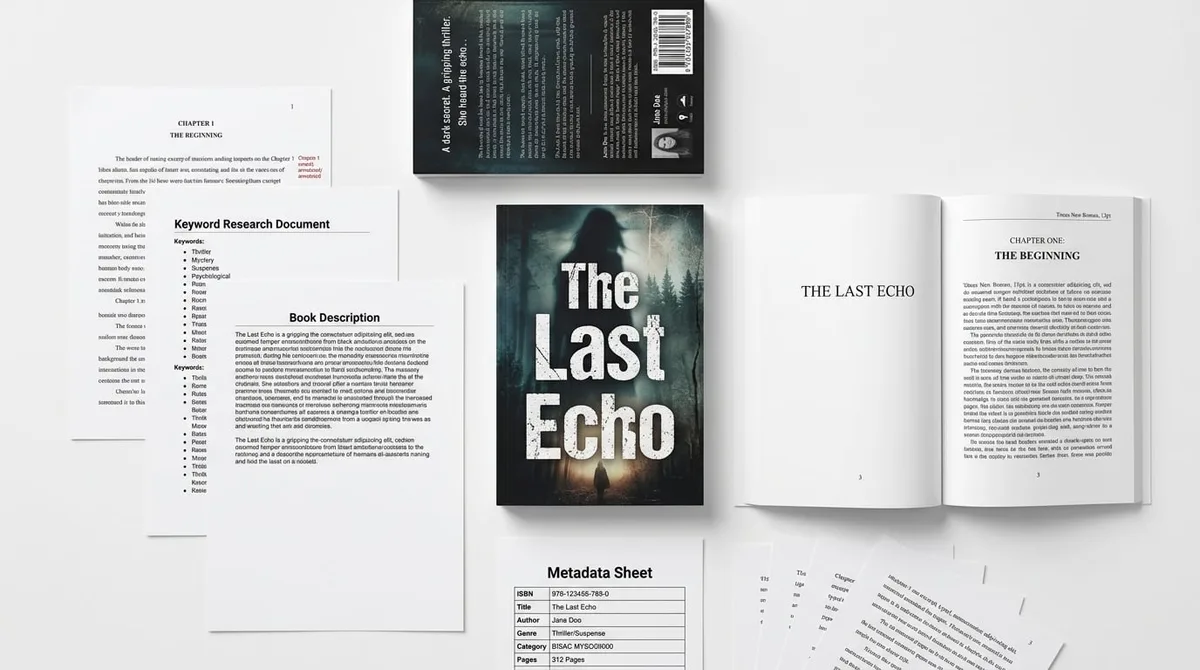
A KDPBuilder publishing package includes the print-ready interior PDF, full-wrap cover at 300 DPI, ebook file, and a metadata sheet with title, subtitle, description, 7 keywords, and category picks — the practical asset set KDP publishers need before upload. See what’s in a publishing package.
Compliance and accuracy risk
Even with ChatGPT helping, the publisher still has to check KDP rules, rights, plagiarism risk, trademark issues, category fit, and overall quality standards. Amazon requires publishers to disclose AI-generated content in KDP during title setup, while AI-assisted content has different treatment under KDP’s AI content disclosure rules. That means you still need to classify the role of AI correctly and review what you are uploading.
The broader point is simple: ChatGPT helps create content, but the publisher remains responsible for the final book.
Where KDPBuilder is different
KDPBuilder is built around the full publishing package, not isolated text output. That is the core difference in kdpbuilder vs chatgpt: one helps you talk through a book, while the other helps you build it as a product.
This matters because a strong KDP listing is not only a manuscript. It is a coordinated set of parts: idea, manuscript, cover, interior, metadata, and final files. When those pieces are designed together, the book looks more intentional and more consistent from the first thumbnail to the last page.
Manuscript plus production assets
KDPBuilder is aimed at publishers who do not want to manage every asset separately. Instead of drafting text in one tool, designing elsewhere, formatting in another place, and then fixing upload problems, the studio workflow keeps the book package aligned. That reduces the chance that one piece looks polished while another piece looks unfinished. If you want a side-by-side view of that difference, the Compare Publishing Tools page is the best place to start.
This is especially useful for books where structure matters as much as prose. If the manuscript, the interior, and the metadata are all created as parts of one system, the final product feels more complete.
Designed interiors and covers
KDPBuilder is especially relevant for products that are visual or format-driven. That includes coloring books, puzzle books, workbooks, guided journals, and activity books. In those formats, the layout is the product. If the page flow, spacing, prompts, or art style is off, the book fails even if the text is serviceable.
For a closer look at how that package is assembled, you can see a complete sample package and judge the manuscript, cover, interior, and metadata together instead of as separate parts.
Metadata that matches the product
A studio workflow can also keep metadata aligned with the actual book. That includes title language, subtitle positioning, description tone, and format signals. When the metadata reflects the real product, you reduce the chance of attracting the wrong reader or creating a mismatch between promise and delivery.
Use the sample package experience to judge what “publish-ready” actually means: the question is not whether the text exists, but whether the whole book feels designed to be sold as a single unit.
Cover creation: ChatGPT prompts vs KDP-ready cover workflow
Cover production is one of the biggest differences between ChatGPT and a publishing studio. ChatGPT can help you think through a cover, but it cannot replace the calculations and file assembly needed for a real KDP upload.
Why the Amazon KDP cover calculator matters
For a paperback, Amazon KDP cover requirements depend on trim size, page count, paper type, and bleed settings. Amazon KDP paperback covers require a full wrap file sized from trim size, page count, paper type, and bleed; spine text is only allowed when the book has enough pages for a printable spine. That means the final cover is not just an image. It is a measured production file.
This is where terms like Amazon KDP cover calculator, KDP calculator, Amazon book cover calculator, KDP cover size calculator, and Amazon KDP cover creator become important. They refer to the practical side of cover setup: the right dimensions, the right wrap, and the right safe areas so the file uploads correctly.
Why a KDP cover creator is not just image generation
A prompt-generated image can look interesting, but that is not the same as a production-ready cover. A real KDP cover creator workflow has to account for spine width, bleed, back-cover layout, barcode-safe space, and the final wrap dimensions. Those details cannot be guessed from a prompt alone.
For example, if you change page count or trim size, the spine changes. If you change paper type or bleed settings, the cover dimensions change too. That means the cover file has to be built around the actual book specs, not just the concept art.
Practical difference: ChatGPT can write “minimalist cover with bold title and soft gradient background.” KDPBuilder-style production turns that idea into a file that fits the book’s exact measurements and upload expectations.
Interior formats: why low-content and activity books expose ChatGPT’s limits
Some of the clearest differences between a chat assistant and a publishing studio show up in interior-heavy formats. In low-content and activity books, the page design is the product, so weaknesses in structure show immediately.
Coloring books
For books built around line art, prompts alone are not enough. A tool may help generate concepts, but it does not ensure page-by-page visual design, line consistency, or balanced white space. If you are comparing an AI coloring book generator, coloring book maker, or coloring book AI tool with a publishing studio, the key question is whether the final interior is truly ready for print.
Coloring books fail when pages look crowded, styles jump around, or the art feels too thin or too repetitive. A good interior workflow keeps the illustrations, spacing, and page order coherent from start to finish.
Puzzle books and large print interiors
For puzzle books and large print puzzle books for seniors, layout is even more important. Large print needs readable spacing, clear instructions, and room for solve space. Puzzle books need answer keys, clean page sequencing, and consistent formatting across many pages. ChatGPT can help generate the puzzle concepts and instructions, but it does not guarantee the interior will be accessible or visually clean.
That is a frequent failure point: the book may technically contain the right content, but the layout makes it frustrating to use. A studio workflow helps avoid that by treating formatting as part of the product, not an afterthought.
Workbooks and guided journals
Workbooks and guided journals need structure that feels intentional. Page prompts should flow logically, sections should repeat in a usable pattern, and the spacing should support writing or reflection. ChatGPT can draft prompts, but it does not make sure the page rhythm works across the whole book. That is where a publishing-focused system has the advantage.
- Check that each page serves a clear function.
- Make sure the spacing matches the activity type.
- Confirm that instructions repeat consistently.
- Review whether the interior is readable in print, not just on screen.
- Match the cover style to the interior style so the product feels cohesive.
Cost comparison: free prompts vs finished publishing package
At first glance, ChatGPT may seem cheaper because the tool cost is low or already included in your workflow. But that is not the same as total production cost.
The real cost of doing everything manually
The hidden costs of a ChatGPT-led publishing workflow can include formatting tools, cover design, image generation, stock assets, proofreading, editing, metadata tools, PDF fixes, and time spent correcting upload issues. Even if the writing itself is fast, the assembly work can add up quickly.
There is also the cost of revisions. If the manuscript is repetitive, the interior is off, or the cover dimensions are wrong, you spend more time fixing the book after the fact. That is time you could have spent on the next title.
When paying for a studio workflow makes sense
A studio package makes sense when your goal is not just to produce words, but to produce a finished book package. If you value consistency, speed of assembly, and fewer production gaps, the studio approach may save time even if the upfront workflow is more structured.
This is why KDPBuilder should not be framed as the cheapest option. It is the designed, publish-ready option for people who want fewer loose ends. For pricing context, compare the full workflow against the work you would otherwise need to do manually at KDPBuilder Pricing.
Step 1: Count how many tools you would need to finish the book.
Step 2: Add the time needed to fix file issues.
Step 3: Compare that with a single workflow built for KDP production.
Step 4: Choose the route that matches your publishing standard.
| Mistake to avoid | Why it hurts KDP | Better approach |
| Using ChatGPT output as the final manuscript | Generic phrasing, repetition, and factual drift can weaken the book | Edit for voice and structure before publishing |
| Designing the cover before final specs are known | Trim size, page count, bleed, and spine width can change the file | Build the cover from the actual book measurements |
| Separating metadata from the interior | The listing can promise something the book does not deliver | Keep title, description, and format aligned with the manuscript |
| Using a different tool for every asset | Files can become inconsistent across manuscript, cover, and export | Use one workflow that keeps the package connected |
Which should you choose?
The better choice depends on how hands-on you want to be with production. If you enjoy directing every file, checking every specification, and stitching together the final package yourself, ChatGPT can be a productive assistant. If you want the production path to be built into the tool, KDPBuilder is the cleaner BOFU choice.
Choose ChatGPT if...
Choose ChatGPT if you want help with brainstorming, rough drafts, rewrites, and early-stage ideation, and you are comfortable assembling the final book yourself. It is a strong assistant when you already know how to manage interiors, covers, metadata, and export files.
Choose KDPBuilder if...
Choose KDPBuilder if you want a cohesive product package and do not want the book to look assembled from prompts. It is the better fit when you want manuscript, cover, interior, metadata, and files to feel connected from the start. Try KDPBuilder Free if you want to inspect the studio workflow before choosing a plan.
Use both if...
Some publishers will use both tools together. A practical hybrid workflow is to use ChatGPT for raw idea exploration and early drafting, then use KDPBuilder for the final book package. That lets you keep the speed of a chat assistant while still ending with a structured, publish-ready workflow.
If you are comparing broader tool categories, think of this as AI book generator versus AI publishing studio. The first helps you create content fragments; the second helps you package the book as a product. For a broader lens on tool selection, you may also want to read AI Book Generator vs AI Publishing Studio.
FAQ
Is ChatGPT enough to publish a book on Amazon KDP?
ChatGPT can be enough to help you draft a book, but it is not enough by itself to produce a complete KDP publishing package. You still need to create the cover, format the interior, prepare metadata, and verify compliance details before uploading. If you are experienced with publishing production, ChatGPT can fit into the workflow; if not, you may need a studio-style system to finish the job cleanly.
Can I use ChatGPT for KDP books without violating Amazon rules?
Yes, you can use ChatGPT as part of a KDP workflow, but you still need to follow Amazon’s disclosure and content rules. Amazon requires publishers to disclose AI-generated content in KDP during title setup, while AI-assisted content is treated differently under KDP’s AI content disclosure rules. The important part is to be accurate about how AI was used and to make sure the final book meets quality and rights requirements.
What are the biggest ChatGPT book publishing limitations?
The biggest limitations are formatting, cover production, and consistency. ChatGPT does not automatically make print-ready interiors, calculate a paperback cover wrap, or align the whole product across manuscript, design, and metadata. It can also produce repetitive or inaccurate text, so human review is still necessary.
Does ChatGPT create KDP-ready covers and interiors?
No, not on its own. It can help you plan a cover or draft interior content, but it does not generate final production files that account for trim size, bleed, spine width, pagination, and export requirements. You still need a production workflow to turn the concept into an upload-ready file set.
Do I still need an Amazon KDP cover calculator if I use ChatGPT?
Yes. ChatGPT can describe a cover concept, but the final paperback cover still needs the correct wrap dimensions. Tools like an Amazon KDP cover calculator, KDP calculator, or KDP cover size calculator matter because the cover depends on trim size, page count, paper type, and bleed. Without those specs, the file may not fit the book correctly.
Is KDPBuilder better than an AI coloring book generator?
If you want a single coloring page idea, an AI coloring book generator may be enough for exploration. If you want a full book package with a coherent interior, matching cover, and KDP-ready files, KDPBuilder is the stronger choice. The difference is between generating content pieces and building a product that looks designed from cover to interior.
Final recommendation: use ChatGPT when the job is thinking, drafting, or rewriting. Use KDPBuilder when the job is finishing. If you want to judge the difference yourself, start with Try KDPBuilder Free to see the six-phase studio workflow, or go straight to KDPBuilder Pricing if you are ready to compare plans against the cost of doing production manually.
Turn this idea into a book — free sample
Type a book idea and we'll generate a real cover preview in about a minute. No signup, no card.