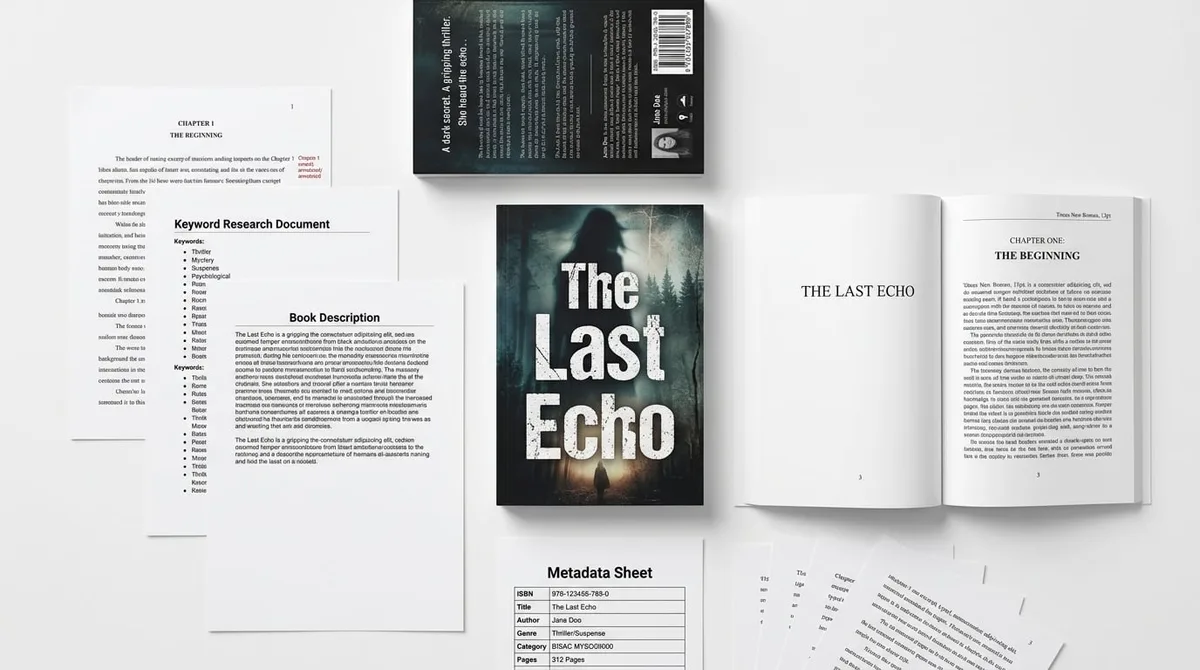
AI Book Generator vs Publishing Studio: Before/After

Skip the theory? Generate a free book preview in about a minute — no signup, no card.
Try it freeA one-click generator can give you pages. It cannot decide whether those pages belong together, whether the cover is selling the right promise, or whether the finished book looks credible next to real competitors on Amazon. That is the practical difference in the ai book generator vs publishing studio decision: speed of output versus quality of the finished publishing package.
If you are deciding between a tool-only workflow and a studio workflow, do not ask, “Which one can make a book fastest?” Ask, “Which one can turn an idea into a coherent KDP-ready product — manuscript, cover, interior, metadata, and files — without looking like it was assembled from disconnected prompts?”
The Core Difference: Output vs Publishing Package
In the simplest terms, an ai book generator vs publishing studio comparison comes down to components versus coordination. A generator can create a manuscript draft, a cover idea, or a set of interior pages. A studio is responsible for how those pieces work together as one reader-facing product.
KDPBuilder’s position is straightforward: stop publishing books that look generated; start building books that look designed. The difference is a studio pipeline with editing, design, and QA gates — not a bigger prompt. If you want to inspect that difference before you create an account, see a complete sample package.
What a generic AI book generator usually gives you
A typical generator is useful for speed, but it often delivers separate assets without a publishing plan. You may get a draft with chapter headings, a cover prompt result, or a page layout template, but each piece can still feel disconnected from the others.
That means the output may be usable, but not necessarily coherent. A title can sound broad, a subtitle can overpromise, and the manuscript can drift from the reader promise by chapter 3. For a deeper breakdown of the visual and structural giveaways, see Why AI Books Look Generated: 12 Cheap Tells.
What a publishing studio is responsible for
A publishing studio is not just a design service. It handles the sequence that makes a book market-ready: concept shaping, manuscript editing, visual direction, trim planning, metadata alignment, and final file preparation.
That is the difference between a file set and a publishable product. One gives you material; the other gives you a package that looks deliberate from cover to interior to Amazon listing. KDPBuilder’s workflow is built around that complete package, and the sample is published unedited so you can inspect the output as-is through the sample package page.
Proof: KDPBuilder publishes a complete, unedited sample package — manuscript PDF, full-wrap cover, interior, and metadata sheet — so you can inspect real output before creating an account. Inspect a complete sample package.
Before: What a Generic AI Book Usually Looks Like
Most readers can spot the gap between a generic AI book and a professional publishing package quickly. The book may technically exist, but it often gives away its origin through weak positioning, repetitive structure, and mismatched design choices.
This is not limited to text-heavy books. It also applies to visual products like coloring books, activity books, low-content journals, and hybrid AI projects where the images, page order, and cover message do not feel unified.
The manuscript sounds assembled
Generic output often reads like parts stitched together rather than a book with a clear point of view. One chapter may be too broad, another too thin, and the overall structure may not match the promise on the cover.
A common tell is repetition. If three different chapters explain the same idea in slightly different words, the manuscript feels generated instead of edited.
The cover looks like a template
The cover is usually the first place where a cheap result becomes visible. Generic AI covers often use safe colors, vague imagery, and typography that does not support the genre or audience.
For example, a children’s coloring title may have art that looks decorative but not age-specific, while a business book may look too playful or too plain to earn trust.
The interior has no visual system
Inside the book, the problems become more obvious. Margins may be inconsistent, section breaks may feel random, and page flow may not suit the reading experience.
For coloring books, this can mean line art with uneven complexity, pages ordered without escalation, and blank space choices that do not support printing cleanly. For text books, it can mean headings that feel disconnected from the cover style.
The metadata does not match buyer intent
Metadata is where many generic projects fail quietly. The title, subtitle, description, categories, and keywords often describe the book in a general way instead of matching the actual buyer intent.
If the manuscript is for beginners but the listing sounds advanced, or if the audience is kids but the tone feels adult, the package lacks alignment. That mismatch weakens discoverability and conversion at the same time. Since metadata and disclosure are tied to KDP setup, it helps to review the platform-specific requirements in KDP AI Content Policy: What to Disclose in 2026.
After: What Changes in a Designed Publishing Package
The ai book before after difference is not just prettier design. It is commercial coherence. A designed package makes the promise, structure, visuals, and metadata all point in the same direction.
That shift turns a collection of generated pieces into a book that feels planned from the start. The reader can sense the audience, the use case, and the genre instantly.
Positioning before writing
In a studio workflow, the positioning comes first. That means defining who the book is for, what problem it solves, and what emotional or practical outcome the reader expects.
A clearer position usually improves the entire project in one move. It helps shape the title, chapter structure, cover language, and even the examples used inside the manuscript.
Cover direction before decoration
Instead of decorating a cover after the book is finished, a studio starts with cover direction. That includes genre fit, hierarchy, visual tone, and whether the book should feel premium, friendly, educational, or playful.
When the cover is planned early, the design does more than look attractive. It signals the correct buyer and makes the interior feel like part of the same product.
Interior design before page count
A studio does not treat page count as the main goal. It designs the interior around readability, content type, and print behavior.
- Choose the trim size based on the book’s use case.
- Set margin and gutter spacing before placing content.
- Align headings, images, and page breaks to one system.
- Check that the final PDF prints cleanly and reads without visual friction.
Metadata before upload
Before the file is uploaded, the metadata should already support the book’s market position. That means the title and subtitle should match the buyer’s language, the description should explain the promise clearly, and the category choice should reflect what the book actually is.
Amazon KDP allows AI-assisted and AI-generated content, but publishers must disclose AI-generated text, images, or translations during setup when applicable. That disclosure step does not replace good packaging; it simply means the platform expects transparency alongside proper publishing workflow.
Proof: Books pass through automated quality gates — grid and layout QA for puzzles, vision checks for covers, formatting validation for interiors — and anything that fails is repaired or regenerated before delivery. See gated output quality.
Insider pro-tip: If a book looks good in a mockup but feels vague in the listing, the problem is usually positioning, not design. Fix the promise first, then the visuals will have a job to do.
Example: AI Coloring Book Generator Output vs Studio Package
Searchers who compare coloring book AI, coloring book maker, coloring book generator, and coloring book creator are usually asking the same practical question: can a generated coloring book actually compete with a professionally planned one?
The answer depends on packaging. A raw generator can produce line art, but a studio packages that art into a product with theme consistency, buyer fit, and print readiness.
Generic coloring book AI output
A generic coloring book project often starts with isolated illustrations. The pages may look acceptable individually, but the whole book can feel random.
Common issues include inconsistent line weight, mixed levels of complexity, weak theme progression, and cover art that does not match the interior style. One page may suit younger kids while the next feels too intricate or too plain.
Professional coloring book package
A studio-built coloring book begins with a specific audience and use case. The age fit is chosen first, then the art style, page order, cover promise, and interior spacing are built around that decision.
That approach usually improves four things at once: consistency, usability, print quality, and buyer confidence. It also makes KDP file prep smoother because the artwork and page structure were chosen to work together from the start.
Why cover and interior consistency matters
In coloring books, the cover sets the expectation and the interior must fulfill it page by page. If the cover suggests bold, simple art and the inside contains tiny, dense details, the buyer experience breaks.
The same is true in reverse. If the interior is playful and simple but the cover looks advanced or premium, the book feels mismatched. A studio closes that gap so the product reads as one unified package.
The Cover Problem: KDP Cover Creator Is Not a Brand Strategy
Tools like KDP Cover Creator, cover creator, KDP cover size calculator, and KDP cover calculator are useful, but they solve different problems than a publishing studio. They can help with dimensions and basic setup, but they do not make strategic decisions for you.
KDP cover size depends on trim size, page count, ink type, and paper type. For paperback, the cover must be a single PDF that includes the back cover, spine, and front cover. That technical requirement matters, but it is only one part of the job.
What cover tools can solve
Cover tools are good for checking sizes, placing barcode areas, and helping you avoid obvious formatting mistakes. They are practical for authors who already know the concept and just need the file dimensions to be correct.
They can also help you get to a usable technical result faster, especially when the book already has a clear brand direction.
What cover tools cannot solve
A calculator cannot decide whether your book should look premium or accessible. It cannot choose the right hierarchy for the title, determine whether the subtitle is too long, or judge whether the imagery matches the reader’s expectations.
Most importantly, it cannot tell you whether the cover works as a sales asset. That requires genre judgment, audience awareness, and a sense of what the buyer expects to see before clicking.
Why dimensions are only the final step
Many DIY publishers start with the calculator, but the best workflow starts with strategy and ends with dimensions. First define the concept, then decide the trim size, then calculate the spine, then export the final cover PDF.
That order matters because a cover is not just a file. It is a promise to the buyer, and the promise has to fit the content.
If you are still deciding whether a tool-only workflow is enough, it can help to compare publishing tools against a studio pipeline before you commit to production.
When a Generator Is Enough — and When It Is Not
Being realistic about tools is better than being anti-AI. A generator can be useful when the stakes are low, the goal is exploration, or the book is being built to test an idea before investing in a fuller package.
But there is a clear line between experimentation and publication assets that must compete on Amazon. That line matters most in crowded niches, visual formats, and products meant to support a long-term author brand.
Use a generator for early exploration
A generator is often enough for brainstorming topics, outlining chapters, creating rough concepts, or testing whether an idea has enough structure to pursue.
It can also be useful for simple internal drafts, practice projects, or low-risk assets where visual polish and brand positioning are not the main goal.
Use a studio when the book needs to compete
If the book has to stand beside competing titles, a studio becomes more valuable. That is especially true when the product needs to look credible at first glance, support paid traffic, or fit into a series strategy.
It also matters when the content has visual complexity, when the trim size and interior design affect the reading experience, or when the book must create a lasting author identity instead of a one-off upload.
| Project Type | Generator Works For | Studio Is Better For |
|---|---|---|
| Rough concept testing | Outlines, brainstorms, draft ideas | Usually not necessary yet |
| Crowded niche launch | Fast asset creation | Market fit, cover hierarchy, metadata alignment |
| Coloring or activity book | Single illustrations or page concepts | Theme consistency, page flow, print-ready structure |
| Series or brand-building project | Early drafts | Unified positioning and repeatable product system |
- Choose a generator if the project is a draft, test, or simple asset.
- Choose a studio if the project needs market fit, visual consistency, and reader trust.
- Choose a studio if the book must support advertising, series expansion, or premium positioning.
- Choose a studio if the buyer will judge quality in the first 5 seconds of seeing the cover.
What KDPBuilder Delivers That a Generator Does Not
KDPBuilder is positioned as a publishing studio, not a cheap AI generator or free tool. The value is in the complete package, not in isolated outputs.
That means the service is evaluated differently than standalone writing software or a one-click cover app. You are not just paying for text or images; you are paying for publishing judgment across the full product stack. If you want to review pricing in the context of the full workflow, see KDPBuilder Pricing.
Manuscript and structure
KDPBuilder works from idea to manuscript structure, which means the book is shaped for readability, pacing, and audience expectation. Instead of handing you raw pages, the process focuses on how the content should unfold.
This includes tighter chapter flow, cleaner transitions, and a more deliberate sense of what each section is doing for the reader.
Cover and interior system
The cover and interior are built as a system, not as separate files. That helps the book feel visually unified from thumbnail view to printed page.
When the same design logic runs through the cover, section headings, spacing, and page layout, the book feels intentional rather than assembled.
Metadata and upload-ready files
Studio delivery also includes the practical pieces that make uploading easier: metadata alignment, file preparation, and print-ready exports. For paperback, that means a proper cover PDF with back cover, spine, and front cover prepared together.
It also means the book is set up with KDP realities in mind, including the way trim size, page count, paper type, and ink type affect the final output.
Human publishing judgment
One of the biggest differences is judgment. A generator can produce options, but a studio decides which options belong in the final package.
That judgment is what keeps the book from feeling generic. It is also what helps avoid mismatches between title, content, visuals, and marketplace expectations.
Pricing should be evaluated against the complete package, not only the cost of generating text or images. A low tool price does not tell you whether the book will look ready to publish.
Decision Checklist: Generator or Publishing Studio?
Use this checklist before you decide which path fits your project. The goal is not to reject automation, but to decide whether the book needs isolated output or a designed publishing package.
Choose a generator if...
- You need a draft for brainstorming or concept testing.
- The book is simple, low-risk, and not meant to compete in a crowded niche.
- You are only creating one asset, such as a rough outline, a sample image, or a short internal draft.
- Visual consistency is not critical to the buyer’s decision.
Choose a publishing studio if...
- The niche is competitive and readers will judge the book in seconds.
- The project needs a strong first impression, especially on Amazon thumbnails.
- The book has visual complexity, series potential, or premium positioning.
- You want the title, cover, interior, and metadata to work together.
- You need KDP-ready files with fewer avoidable formatting issues.
If you are still unsure, review a sample package and compare tools side by side. Seeing the before-and-after structure is often the fastest way to tell whether your project needs a generator or a studio.
FAQ
What is the difference between an AI book generator and a publishing studio?
An AI book generator creates one or more assets, such as text, images, or layouts. A publishing studio coordinates the entire book package, including concept, editing, cover strategy, interior design, metadata, and final file preparation. The difference is whether the result is simply generated or actually built to publish.
Can I use an AI coloring book generator to publish on KDP?
You can use AI-assisted content for KDP when it follows Amazon’s rules and you disclose AI-generated text, images, or translations during setup when applicable. The bigger question is whether the output is cohesive enough to compete. A coloring book still needs consistent theme planning, page order, print-ready formatting, and a cover that matches the interior.
Is KDP Cover Creator enough for a professional book cover?
KDP Cover Creator can help with a basic technical cover, but it is not a full brand strategy. It does not decide genre fit, hierarchy, market positioning, or whether the cover matches buyer expectations. For a professional package, the cover needs concept direction before the dimensions are finalized.
Do I still need a KDP cover size calculator if I hire a publishing studio?
Usually the studio handles sizing decisions for you, including the trim size, page count, paper type, and spine width. Since paperback covers require a single PDF with back cover, spine, and front cover, the final dimensions still matter. The difference is that a studio applies those measurements as part of a complete publishing workflow.
What makes a generic AI book vs professional package look different?
A generic AI book usually shows weak alignment between title, cover, interior, and metadata. A professional package feels consistent from the thumbnail to the last page. The strongest difference is not just polish; it is that every part supports the same audience and promise.
What should I look for in an AI book before-and-after example?
Look for changes in positioning, title clarity, cover hierarchy, interior consistency, and metadata alignment. A strong before-and-after example should show more than prettier graphics. It should show that the book now reads like a designed product instead of a generated file set.
Before you upload another prompt-built file set, inspect the kind of package you actually want your name on. Start with the complete KDPBuilder sample package to review the manuscript PDF, full-wrap cover, interior, and metadata sheet. Then use Try Free with 75 credits to test the workflow for your own idea before choosing a paid plan.
Turn this idea into a book — free sample
Type a book idea and we'll generate a real cover preview in about a minute. No signup, no card.